No products in the cart.


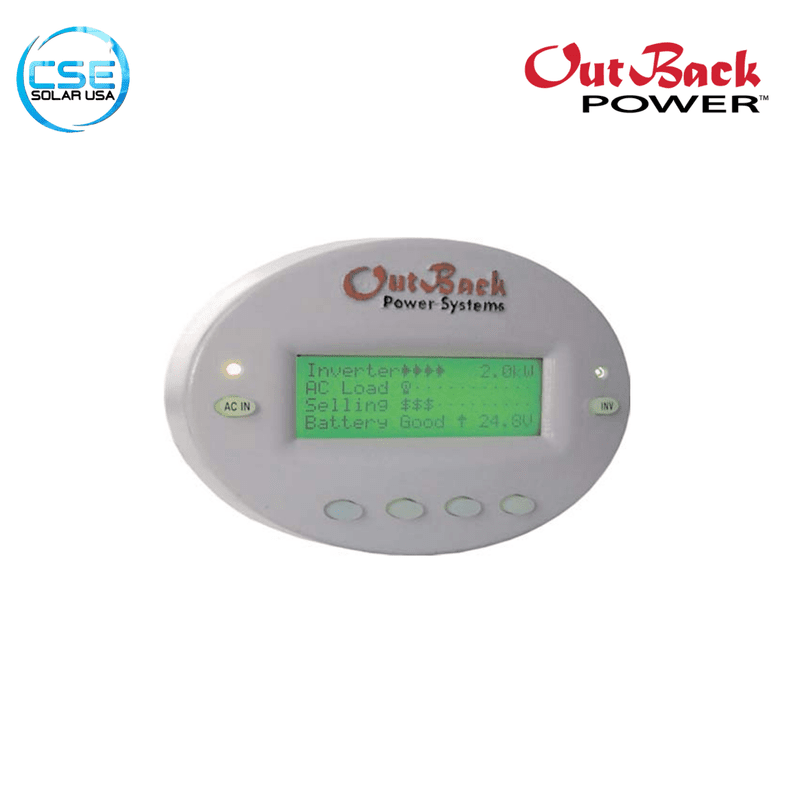



OutBack Power G/FX MATE Controller | Gray Oval Housing
$343.23
11 people are viewing this product right now

Product Features
-
Backlit LCD
-
Soft Key Interface
-
Surface Mount Design
-
Generator Support

OutBack Power G/FX MATE Controller Gray Oval Housing
The OutBack Power MATE System Display and Controller (MATE) is the original, legendary system management tool designed for the OutBack G/FX and MX series components. Housed in its distinctive gray oval casing, this controller serves as the central brain for your power system, allowing you to remotely monitor and program multiple inverter/chargers and charge controllers from a single location.
This specific model features a built-in RS232 serial port (DB9), enabling connection to a PC for data logging and system performance monitoring.
Product Overview
- Model: MATE (Original Gray Oval)
- Part Number: MATE
- Communication: RS232 Serial Port (DB9)
- Display: 4-Line, 80-Character Backlit LCD
- Mounting Style: Surface Mount
- Compatibility: FX / VFX / GTFX / GVFX Inverters, MX60 Controllers
- Max DevicesUp to 10 (requires HUB)
Why Choose the Classic MATE (Gray Oval)
The “Gray Oval” MATE is the go-to controller for legacy OutBack systems. It provides deep control over the FX/VFX series inverters that newer controllers sometimes complicate. If you have an older system or simply prefer the robust, straightforward interface of the original generation, this is the exact replacement part you need. It connects to your system via standard CAT5 cable (up to 1000 feet away), giving you full access to your power room from the comfort of your living space.
Frequently Asked Questions
Q1: Will this work with the new Radian or FXR inverters? It depends. This MATE is designed for the legacy FX, VFX, GTFX, and GVFX series. While it can perform basic monitoring on some newer units, it cannot access the advanced programming menus of the Radian (GS) or FXR “A-series” inverters. For those, you typically need a MATE3 or MATE3s.
Q2: What is the difference between this and the MATE2?
Functionally, they are nearly identical. The difference is physical:
-
MATE (This Unit): Gray oval housing, designed for surface mounting (screwed onto the wall).
-
MATE2: Black rectangular housing, designed for flush mounting (recessed into a hole in the wall).
Q3: Can I connect this to my router/internet?
Not directly. The RS232 port is a “Serial” connection, not an Ethernet/Network port. To monitor this online, you would need to connect it to a PC running monitoring software, or use a third-party serial-to-network adapter solution.
Q4: Do I need a HUB to use this?
If you have only one OutBack device (e.g., just one inverter), you can plug the MATE directly into it without a HUB. If you have two or more devices (e.g., an inverter and a charge controller, or stacked inverters), you must plug them all into an OutBack HUB4 or HUB10, and then plug the MATE into the HUB.
Q5: Is the cable included?
Typically, the unit ships with a standard 7-foot or 10-foot CAT5 cable. You can replace this with any standard CAT5/CAT6 ethernet cable up to 1000 feet in length.
If you have any questions about the item or your order, please feel free to message before purchasing. Thank you!
Key Benefits
-
Complete System Control: One MATE can coordinate the operation of up to 10 OutBack products (connected via a HUB4 or HUB10), preventing conflicts between multiple charging sources.
-
RS232 PC Interface: Unlike the MATE3 (which uses Ethernet/SD), this classic unit features an opto-isolated RS232 DB9 serial port. This allows you to connect it to a PC to use legacy software (like WinVerter) for detailed data logging and graphical analysis.
-
Time-Based Programming: The built-in clock and calendar allow you to program the inverter to run a generator only during specific hours or to prioritize battery charging based on time-of-day utility rates.
-
Non-Volatile Memory: All your critical setpoints and system configurations are stored in permanent flash RAM, meaning you won’t lose your settings if the system shuts down or batteries are replaced.
Specifications
-
Interface: RS232 (DB9 connector)
-
Cable Type: Standard CAT5 network cable (RJ45)
-
Microprocessor: 16 MHz Low Power
-
Memory: 32K Non-Volatile Flash RAM
-
Operating Temp: 0°C to 50°C (32°F to 122°F)
-
Dimensions: 5.75″ x 4.25″ x 2.0″ (15 x 11 x 5 cm)
-
Weight: 1 lb (0.5 kg)
| Weight | 1 lbs |
|---|---|
| Dimensions | 2 × 5.75 × 4.25 in |
| MPN | OP-MATE-GREY |


